




Orderdesk brings a new focus to ShopFloor Suite: managing the execution of production orders. It connects what needs to be produced with the assigned machine, actual progress and confirmed results. The aim is not simply to see that a machine is running, but to understand what it is delivering.
From an order list to an operating picture
Which orders are running? What is waiting? Where is time being lost? How much usable material has been produced? Orderdesk puts these questions into a shared working context for production planning, supervisors and operators.
Order requirements, machine assignments, execution states, time measurements and material confirmations follow the same order. This creates a practical basis for better coordination, earlier intervention and a clearer understanding of production performance.
01 / THE ORDERDESK WORKFLOW
One order. A connected execution workflow.
Orderdesk connects the daily order overview with the work taking place at the machine. Each stage contributes both operational control and information that the next person can use.
- See the work that needs to be done
Review orders by status, machine, location and required date. Open an order to see its material, quantities, dimensions and processing requirements. Planners and supervisors can work from the same order context rather than reconcile separate lists.
- Assign a suitable machine and release the operation
Match the process and dimensions to configured machine capabilities. Assignment and release checks help prevent incompatible routing and conflicting active work on the same resource. The released plan remains a reference for subsequent execution.
- Start production and make interruptions visible
Operators retain manual start, pause and resume controls. With configured, valid machine signals, a selected and released operation can start automatically. Confirmed unproductivity lasting 15 minutes triggers an automatic pause, making the interruption explicit.
- Follow progress against the plan
Compare order-attributed counts and productive time with the plan. For suitable cutting operations, an estimate of remaining productive time uses measured time per cut and remaining cuts. Execution time, productive time and pause time remain distinct.
- Confirm results, not just activity
Record good output, reusable remnants, scrap and material still in process where relevant. Partial confirmations retain the outstanding requirement. Final completion requires confirmation of the applicable results; machine activity alone is not proof of accepted output.
The practical gain: A planner sees what is pending, an operator knows what to execute, and the next shift can see what has actually been completed. The order remains the common reference.
02 / WHY IT MATTERS TO THE BUSINESS
Six ways Orderdesk can improve daily decisions.
The business value comes from acting on order information while production is still under way. These six opportunities connect a clearer view of each order with practical decisions about completion, capacity, coordination and material.
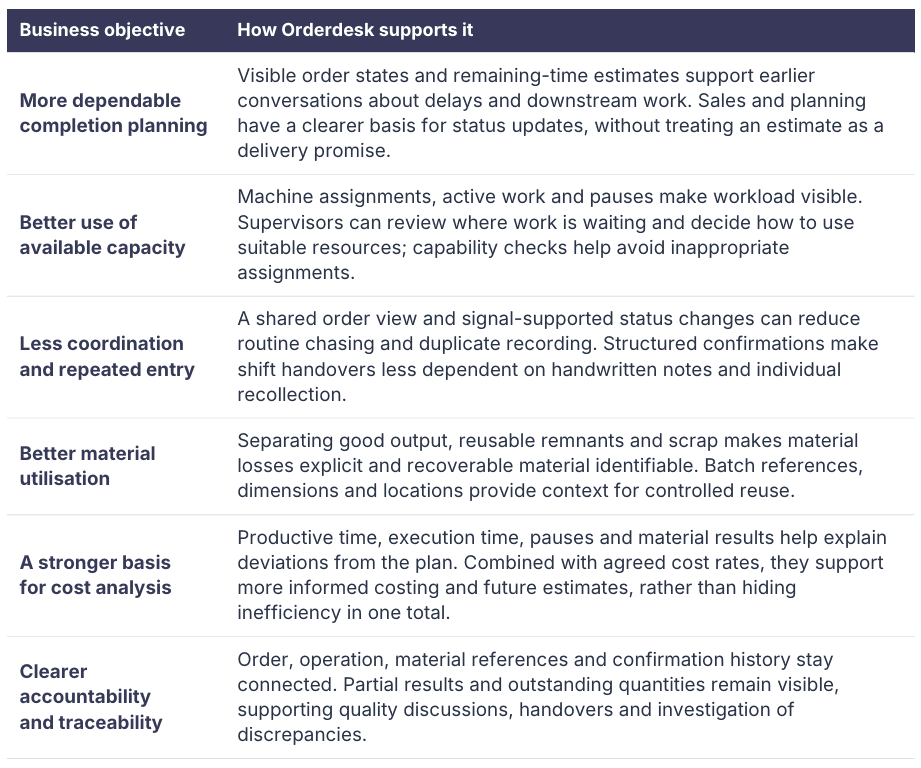
Visibility becomes value when somebody acts: The useful questions are concrete: Which order needs attention? Which machine can take the next operation? Which remnant can be reused? Orderdesk supports these decisions; priorities and responsibilities remain with the business.
03 / AN ILLUSTRATIVE PRODUCTION ORDER
See the time remaining. Account for the material.
Consider a sawing operation in a steel service centre. The figures below are a worked example, not customer performance data. They show how Orderdesk information can support two different decisions.
During production: understand the remaining work
The plan contains 100 cuts. After 60 recorded cuts, productive cutting time is 30 minutes. With valid order-attributed measurements, the calculation is straightforward.

30 minutes / 60 cuts = 0.5 minutes per cut
40 remaining cuts x 0.5 minutes = 20 minutes
This gives a supervisor a basis for reviewing the next job. It is not a guaranteed finish or delivery time: future setup, pauses and downstream operations must be considered separately. Cut progress is also not the same as operator-confirmed good quantity.
At confirmation: distinguish value from loss
At final confirmation, the material figures for the example are reconciled as follows:

The balance is 1,000 = 850 + 120 + 30 kg. The 120 kg of reusable remnants is not scrap. Keeping its batch context, dimensions and location supports a later reuse decision. During partial completion, material still in process belongs in the balance as well.
Two decisions, one order context: Production can review the next machine assignment using progress information. Material planning can evaluate reusable stock using confirmed results. Neither decision should rely on an undifferentiated "completed" flag.
04 / CONNECTED TO THE WAY YOU WORK
One execution approach. Process-specific information.
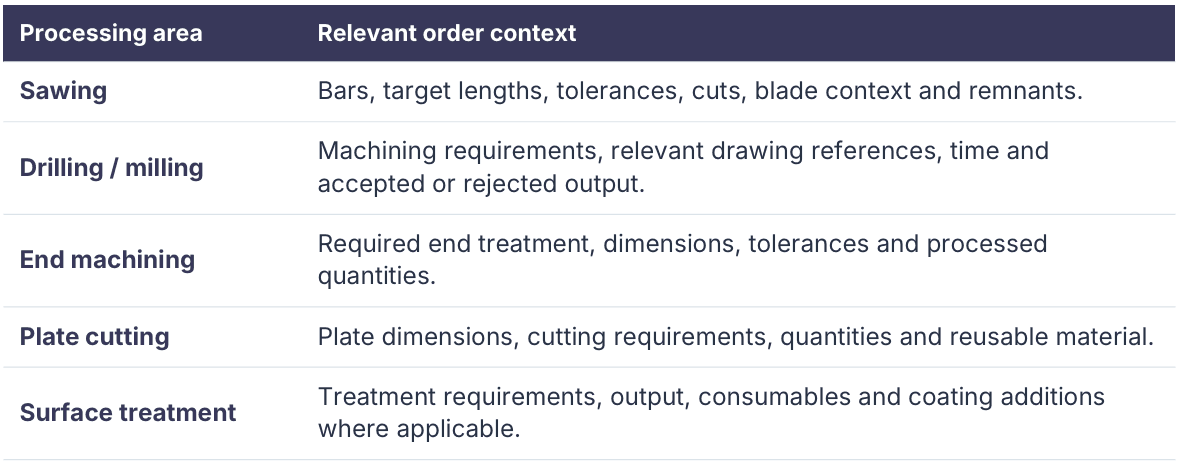
Orderdesk covers relevant processing resources, with information matched to the operation rather than forcing every machine into a sawing template. Machine capabilities and data sources are configured for the actual use case.
Alongside SAP and other ERP systems
An ERP system can remain authoritative for commercial orders, materials and upstream batch references, while Orderdesk adds execution context. Order requirements flow towards the shop floor; agreed production results form the basis of a return confirmation.
Production interfaces are project-specific: field mapping, ownership, revisions, units, confirmation rules and error handling must be agreed and tested. The Orderdesk demonstration uses simulated SAP-style order and confirmation data; it is not evidence of a live, certified or out-of-the-box SAP connection.
The rest of ShopFloor Suite supports the order
Cockpit Live adds machine context, Operator provides machine-related information, and Resources supplies asset data and documents. Servicedesk and Servicemobile help handle issues that affect execution. Together, these views keep production work and the information needed to resolve interruptions connected.
05 / TURN VISIBILITY INTO BUSINESS VALUE
Start with an order flow. Measure the improvement.
A useful pilot follows representative orders through assignment, execution, partial results and final confirmation. Compare similar products, machines and shifts before and after the change.
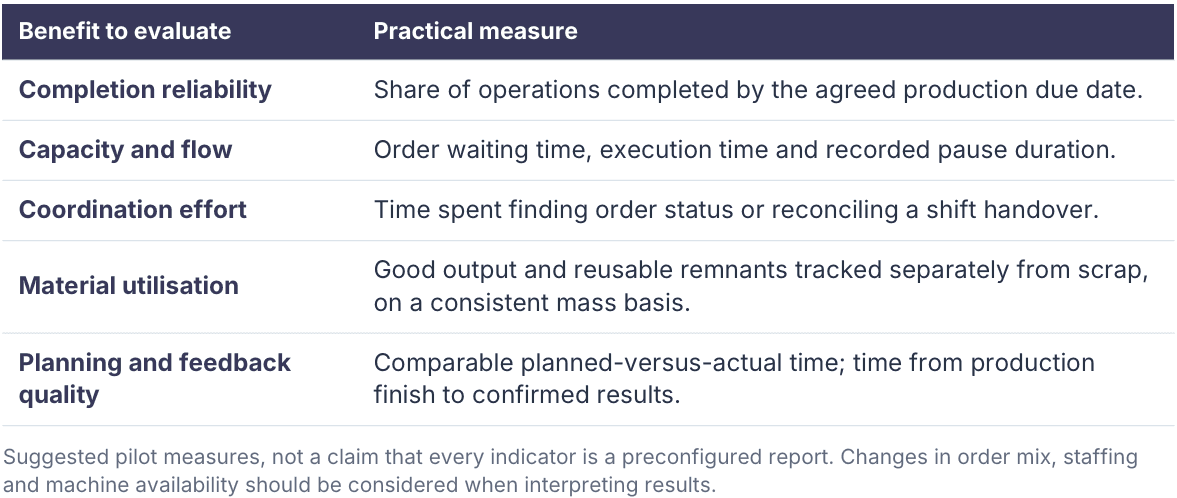
A focused route to adoption
Choose one processing area and an owner for the workflow. Configure machines, order requirements, signals and confirmation rules. Exercise a normal order, an interruption and a partial completion, then review whether the information improves real decisions before extending the scope.
Experience Orderdesk with your own production scenario: Bring a representative order, a machine group and a material result. Explore how assignments, progress, remaining-time estimates and confirmations could work together in your operation.
Arrange an Orderdesk demonstration
← Back to Insights